Current Volume Data Group Elements
There are several unique current volume data group elements; each has a specific purpose. Make sure you are familiar with each one's specific purpose before using them.
For more information, see the following subsections below:
- Current Volume Data Group Elements Summary
- CAccVol and CMAcf Data Group Elements
- Vol Data Group Element (History – Log Period)
- Vol Data Group Element (History – Daily)
- CRVolTday and CREnTday Data Group Elements
- Register Data Group Element
- Volume Values Comparison
Note: The "Basic Poll" data group in the CygNet Totalflow templates does not contain an element that retrieves the daily current accumulated volume (or daily current accumulated energy). If you want an element to retrieve the daily accumulated volume (or daily current accumulated energy) for the last log period, use the CRVolTday (or CREnTday) data group element in the "History – Daily" data group. Add the CRVolTday and CREnTday data group elements in the "History - Daily" data group by copying the following lines into your template:
|
<CRVolTday desc="Current Vol Today" type="r4"/> <CREnTday desc="Current EnergyToday" type="r4"/> |
Current Volume Data Group Element Summary
This table shows the data groups and data group elements that retrieve different kinds of current volume data for all CygNet-provided Totalflow templates.
| Data Group | Data Group Element | Data Timestamp | Description |
|---|---|---|---|
|
Basic Poll |
CMAcf |
N/A |
The accumulated volume in cubic feet since a volume rollover event or a meter reset, not the accumulated volume for the day or period. |
|
Basic Poll |
CAccVol |
N/A |
The accumulated volume since a volume rollover event or a meter reset, not the accumulated volume for the day or period. |
|
History – Log Period |
Vol |
Beginning of log period. |
The accumulated volume for a completed log period. |
|
History – Daily |
Vol |
Beginning of contract day. |
The accumulated volume for a completed day or as of the last completed log period for the current day. |
|
History – Daily |
CRVolTday |
End of last completed log period. |
The accumulated volume for the current day as of last completed log period. The value derives from the Vol element in the same data group, but the host applies a timestamp that represents the end of the last completed log period. |
|
History – Daily |
CREnTday |
End of last completed log period. |
The accumulated energy for the current day as of last completed log period. The value derives from the Vol element in the same data group, but the host applies a timestamp that represents the end of the last completed log period. |
|
Register |
Custom |
Current date/time. |
User-defined. Current value and timestamp. |

CAccVol and CMAcf Data Group Elements
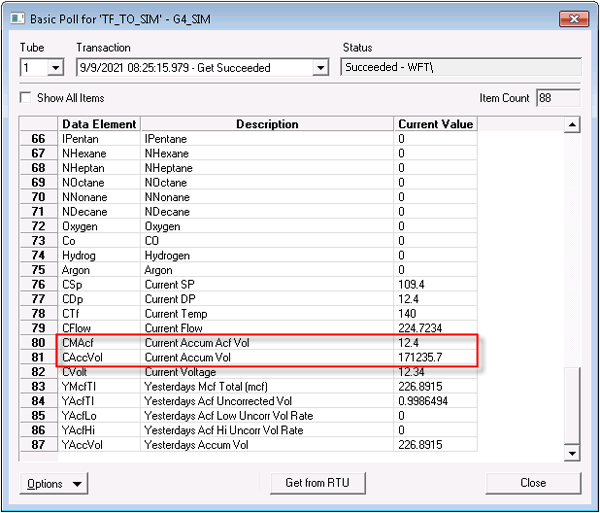
The CAccVol and CMAcf data group elements are part of the "Basic Poll" data group.
CAccVol represents the accumulated volume since a volume rollover event or a meter reset. This volume rollover event is not a log period or contract hour roll over. It is a manual entry to the flow computer requesting the accumulation to start over or occurs when the volume reaches an allowable maximum value.
CMAcf is the same as CAccVol, except its units are actual cubic feet.
|
| Accumulation data group elements in the Basic Poll data group |
Vol Data Group Element (History – Log Period)
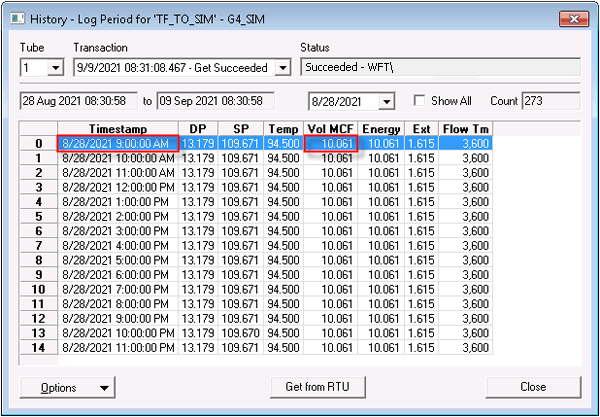
The Vol element in the "History - Log Period" data group represents the accumulated value for a set log period.
See also Vol Element (History - Daily).
Example
If a log period is set to 1 hour, the value of this element is the accumulated volume for an hour. The value rolls over (that is, resets to 0) when the log period expires. The value is timestamped by the RTU with the date/time of the beginning of the log period.
|
| Vol data group element in the "History – Log Period" data group |
Vol Data Group Element (History – Daily)
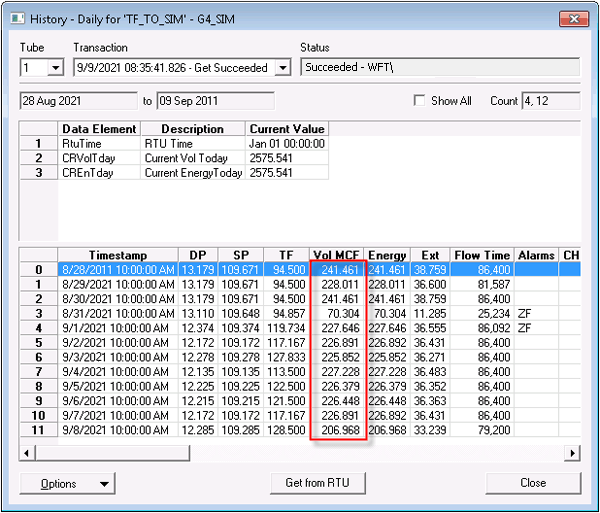
The Vol element in the "History - Daily" data group represents the accumulated volume for a completed day, contract hour to contract hour. CygNet does not perform point processing for this value for the current day. A real-time, latest-log period value displays in the DDS, but this is not the point-processed value CygNet uses for connected operations. If you create a point for this element, the point must represent the previous day’s volume. For the daily current value, use the CRVolTday element.
See also Vol Element (History - Log Period).
Example
If a contract hour is set to 2:00 a.m., the log period is 1 hour, and the time of the request is 10:37 a.m., the accumulated volume displayed is the total volume value from 2:00 a.m. until 10:00 a.m. At 11:00 a.m., the value of the 10:00-11:00 a.m. hour is added to the accumulation. The Vol element timestamp for this data group does not show the last completed log period. It only shows the contract date and hour. Only a completed-day value would be stored in the VHS.
|
| Vol data group element in the "History – Daily" data group |
CRVolTday and CREnTday Data Group Elements
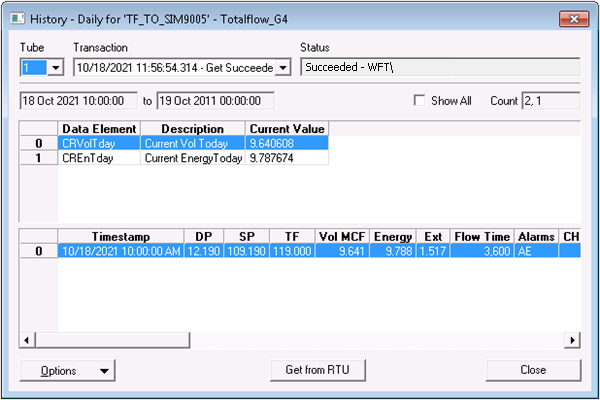
The CRVolTday element processes the accumulated volume for the current day up to the end of the last log period. It derives its value from the Vol element in the same data group, but the host applies a timestamp of the end of the last completed log period. Because both the value and timestamp for this element are dynamic, CygNet processes a point value for this element for the current day.
The CREnTday element processes the accumulated energy for the current day up to the end of the last log period. It derives its value from the Vol element in the same data group, but the host applies a timestamp of the end of the last completed log period. The energy value is a multiple of the daily volume; its value depends on the energy units this data group element is configured for.
|
| CRVolTday data group element in the "History – Daily" data group |
Register Data Group Element
A register data group element represents a device manufacturer application from which you can retrieve data. The device manufacturer applications available to you depend on your agreement with Totalflow. Register data group elements combine to make up a register data group. A register data group is a user-defined data group.
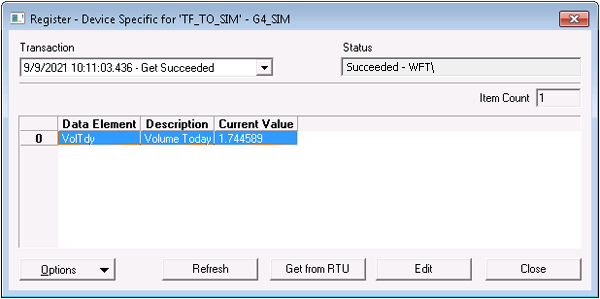
You can create a data group that includes a data group element for the daily current volume. The register that holds the value for this element updates every volume calculation period (usually 1 second). Each time you poll for this value, you receive the daily current accumulated volume. The value is timestamped with the host time by the host. For real-time current volume data, this is the best option; however, it is not simple to implement because it requires that you create a custom data group. For information about how to create a register data group, see Register Data Group.
|
| Data group element showing accumulated volume in a user-defined register data group |
Volume Values Comparison
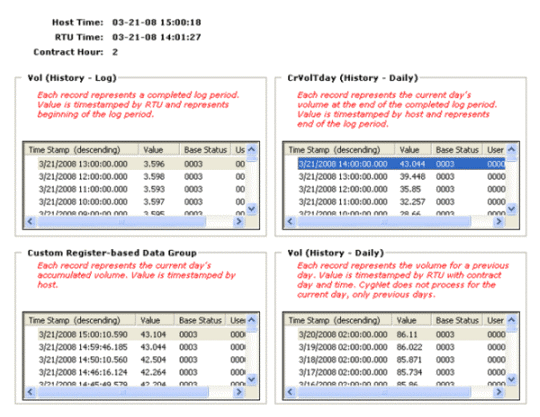
This screen shot compares points for various data group elements that are used to represent volume. It shows both values and timestamps. Host time, RTU time, and contract hour are shown at the top of the screen shot.
The point value for the register-based data group element is close to that of the point value for the CRVolTday element when the time is close to the start of an hour. This is because the CRVolTday log period is 1 hour and the CRVolTday value is updated once a log period completes. As the hour progresses, the values diverge because the register-based point continues to update at a shorter interval.
The timestamps are off by one hour because the host and RTU times vary by one hour. If the host and RTU had the same time setting or a time-zone adjustment, the timestamps would match more closely.
|
| Comparison of Volume Values |

